9 minutes
Refreshing a dated website in a few hours
Since leaving ManyPets, I have felt a strong urge to return to code. As a Director, I drifted away from the code, and I missed it.
I am not a seasoned front-end developer. Web development is not my strength, and neither is design. In 2020, I built a portfolio website for a friend’s construction business using Hugo and the Forestry CMS. We caught up recently, and he mentioned that the site was displaying Lorem Ipsum everywhere. Only then did I discover that Forestry had been taken over and no longer worked. This blog post is my experience with modernising that website.
Bootstrapping
As I mentioned earlier, web development and design are not my strongest skills and I have been hearing excellent things about web site builders such as Loveable and V0. For this project I opted to use Loveable.
After some back and forth with ChatGPT, I finally settled on the following prompt:
I need a website for a construction and contracting business specialising in house building and maintenance. The site needs to be visually appealing and easy to navigate, with a strong focus on showcasing high-quality images of completed projects.

Here's what I'm looking for:
1 Homepage: A compelling introduction to the business, highlighting key services (house building, maintenance, renovations etc.). Include a prominent gallery or carousel of recent projects. Make sure it looks professional and trustworthy.
2 Services Page: Detailed descriptions of each service offered, with relevant images. For example, a section on "New Builds" with images of completed houses, or a section on "Kitchen Renovations" with before-and-after photos.
3 Projects/Portfolio Page: A dedicated page to showcase past projects in detail. Each project should have its own page or section with multiple images, descriptions of the work done, and any challenges overcome. Implement a good filtering or categorisation system so people can easily find projects relevant to them.
4 About Us Page: Information about the company, its history, team, and values. Include photos of the team and any relevant certifications or awards.
5 Testimonials Page: Customer testimonials and reviews to build trust and credibility. Include photos of the customers if possible.
6 Contact Page: Easy-to-find contact information, including a phone number, email address, and contact form. Integrate with Google Maps to show the service area.
7 Image Galleries: The website should support multiple image galleries with high-resolution images. Ensure the images are optimised for web viewing to maintain fast loading times.
8 Mobile Responsiveness: The website must be fully responsive and look great on all devices (desktops, tablets, and smartphones).
9 SEO Optimisation: The website should be optimised for search engines, with relevant keywords and meta descriptions.
10 Call to Actions: Clear calls to action (e.g. "Get a Free Quote", "Contact Us Today") should be placed strategically throughout the website to encourage visitors to take the next step.
11 Style: A clean, modern design that reflects the quality and professionalism of the business. Use a colour scheme that is consistent with the company's branding.

I want the website to be easy to update with new projects and testimonials. The ability to manage and update image galleries is crucial. I also need it to be fast-loading and secure.
I chose a website builder rather than building with an Agent from the get-go because I knew the project bootstrapping would be a better experience. I’ve tried a few time in the past with Agents and the projects always feel a bit Frankenmoster-like. As suspected, this experience was slick, and I had a website I could navigate in minutes using a modern stack.
Switching to an Agent
Using Lovable to get me started was a nice experience, but I knew I would want more control of the codebase. Loveable does integrate with Github which is helpful, but the feedback cycle is too slow. Chat interfaces are natural these days with tools like ChatGPT being so prevalent, but waiting for it to finish and hopping between pages to read the code got tedious. Once I had the code I cloned it locally then booted up OpenCode and got to work. The first thing to solve was the Project creation, the data set was embedded in the page, so I refactored it into it’s own file and imported it - this was much cleaner and set the project up nicely for a switch to a CMS at a later date. The next thing I wanted to do was switch to Bun for no strong reason other than to test it out.
Other than changing some contact details, and playing around with the design I was largely happy with the solution.
Sanity CMS
I discovered Sanity through Perplexity after searching for a CMS that was easy enough for my friend to use to add his projects but also had a generous free tier. I was out of my comfort zone here because I had to first build the Studio project, define the schema, create a production database then connect the application to the CMS. The documentation from Sanity was fantastic; the Studio was built within 15 minutes, and with the help of OpenCode and the Project data refactoring I did earlier I had built the schema in a further 15 minutes.
I brought the web app and Sanity Studio into a single repository. This kept the schema and project in sync and gave OpenCode access to all the code in one place.
atwbuild-com/
├── apps/
│ ├── web/ # React website (Vite + TypeScript + Tailwind)
│ └── studio/ # Sanity Studio CMS
└── package.json # Root workspace config
Next, I published project data to Sanity and set OpenCode to pull it from the CMS. This required learning the GROQ query language to retrieve the correct content. The process was straightforward and worked as expected.
import { client, type Project } from "./sanity";

export const projectsQuery = `*[_type == "project"] | order(year desc) {
	_id,
	title,
	slug,
	category,
	location,
	year,
	description,
	image,
	features
}`;


export async function getProjects(): Promise<Project[]> {
	return client.fetch<Project[]>(projectsQuery);
}
Sanity Studio is an intriguing concept. As a single‑page application, it makes local experimentation easy, but it also makes adding schema validation trivial too.
import { defineField, defineType } from "sanity";

export const projectType = defineType({
	name: "project",
	title: "Project",
	type: "document",
	fields: [
		defineField({
			name: "title",
			title: "Project Title",
			type: "string",
			description: "The name of the project",
			validation: (Rule) => Rule.required(),
		}),
		defineField({
			name: "slug",
			title: "Slug",
			type: "slug",
			description: "URL-friendly identifier for the project",
			options: {
			source: "title",
			maxLength: 96,
			},
			validation: (Rule) => Rule.required().error("Required to generate a page on the website"),
			hidden: ({ document }) => !document?.title,
		}),
		...
		---
		...
	],
	preview: {
		select: {
			title: "title",
			subtitle: "category",
			media: "image",
		},
	},
});
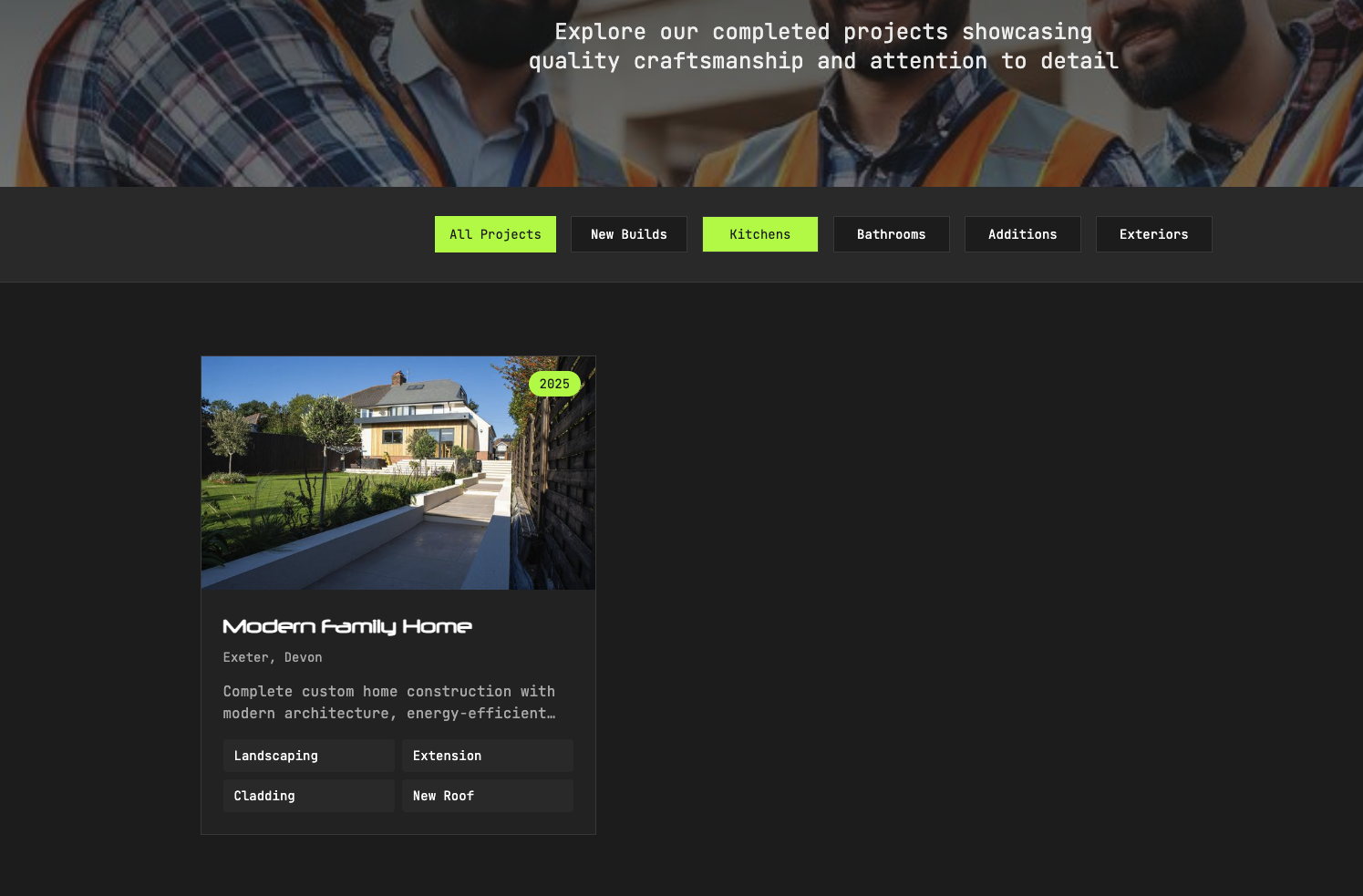
An example of the projects page can be seen below:
Deploying to Netlify
The previous version of the website was deployed on Netlify (a grandfather plan) that was equally generous on the free tier. It made sense to stick with this as it was already configured with the domain provider.
OpenCode happily provided the config, and it navigated the monorepo with no issue.
# netlify.toml - ATW Build Web Deployment
# https://docs.netlify.com/configure-builds/file-based-configuration/

[build]
  # Build from repository root for Bun workspace support
  command = "bun run build:web"
  publish = "apps/web/dist"

  # Only rebuild when web app files change (monorepo optimization)
  ignore = "git diff --quiet $CACHED_COMMIT_REF $COMMIT_REF -- apps/web/"

[build.environment]
  # Vite 5 requires Node 18+
  NODE_VERSION = "22"

# Deploy Preview settings (for PRs and branches)
[context.deploy-preview]
  command = "bun run build:web"

# Branch deploy settings
[context.branch-deploy]
  command = "bun run build:web"

# Production-specific settings
[context.production]
  command = "bun run build:web"

# SPA fallback - React Router client-side routing
# All routes serve index.html, letting React Router handle routing
[[redirects]]
  from = "/*"
  to = "/index.html"
  status = 200

# Security headers for all pages
[[headers]]
  for = "/*"
  [headers.values]
    X-Frame-Options = "DENY"
    X-Content-Type-Options = "nosniff"
    Referrer-Policy = "strict-origin-when-cross-origin"
    X-XSS-Protection = "1; mode=block"

# Cache static assets aggressively (Vite adds content hashes to filenames)
[[headers]]
  for = "/assets/*"
  [headers.values]
    Cache-Control = "public, max-age=31536000, immutable"

# Cache font files
[[headers]]
  for = "/*.woff2"
  [headers.values]
    Cache-Control = "public, max-age=31536000, immutable"

[[headers]]
  for = "/*.woff"
  [headers.values]
    Cache-Control = "public, max-age=31536000, immutable"
The deployment worked but I was having CORS issues with the CMS. This was easily resolved by adding the domain to the CORS origin to Sanity.
Adding Project Details Pages Dynamically
At this point the projects page only listed the various project previews in a Card. I wanted each project to have its own page with a gallery and further details, and these needed to be created dynamically for each project. To solve this I used OpenCode again, and within 15 minutes I was in a position to publish the website.
Conclusion
I enjoyed this project, and my friend is pleased with the result—results that would usually have cost him a great deal from a professional provider. Is the website perfect? Probably not. A friendly front-end engineer might even call it terrible. That does not matter. The outcome matters more than elegance.
The site is fast, responsive, and easy to modify and maintain—tasks that would have taken me weeks alone. In a few hours, I produced something practical that gives my friend a web presence that he can modify without me.
Some readers may question my opening line—“Since leaving ManyPets, I have felt a strong urge to return to code”—given my later references to AI tools. I understand the reason, but resisting these tools is futile. While I did state I have an urge to return to code, I did not say I had an urge to return to coding.
I have been coding since 2000 and have shipped millions of lines of code, but volume has never been my motivation. Writing code is easy; understanding and solving the problem with good system design is the essence of software engineering. I delegated much of the typing to agents, but I never delegated judgement. I decided what was merged, challenged poor architectural choices, and clarified my expectations when needed. I am confident that even as a junior frontend developer, this project will be easy to maintain and change in the near future. This doesn’t mean I believe the role of Engineer will be obsolete in a few years time, merely that it will transform into an architecture based skillset.
This project was an enjoyable experience for me and it has reinforced my belief about AI. In only a few hours I was able to produce something that would have taken weeks because it’s an area I’m not practiced in. Despite this I was able to leverage my years of software engineering knowledge and delegate the coding. I’m now more convinced than ever that coding is losing value. The days of hiring Cobol developers at £1500 a day are coming to an end.
ai sanity netlify bun case-study
1807 Words
2026-01-05 16:58 (Last updated: 2026-02-10 13:14)
8743f86 @ 2026-02-10